ClickUp is a cloud-based productivity and project management platform aimed at teams and individuals who juggle multiple disconnected tools for tasks, documents, chat, and reporting. It positions itself as a single workspace that consolidates project management, knowledge management, communication, and AI assistance, reducing the "work sprawl" that happens when context is spread across many apps. The platform targets startups, agencies, and enterprise teams alike, scaling from free personal use to enterprise-grade deployments with security and compliance controls. Its core pitch is replacing point solutions (task trackers, doc tools, chat apps, time trackers) with one connected system layered with AI.
What it does
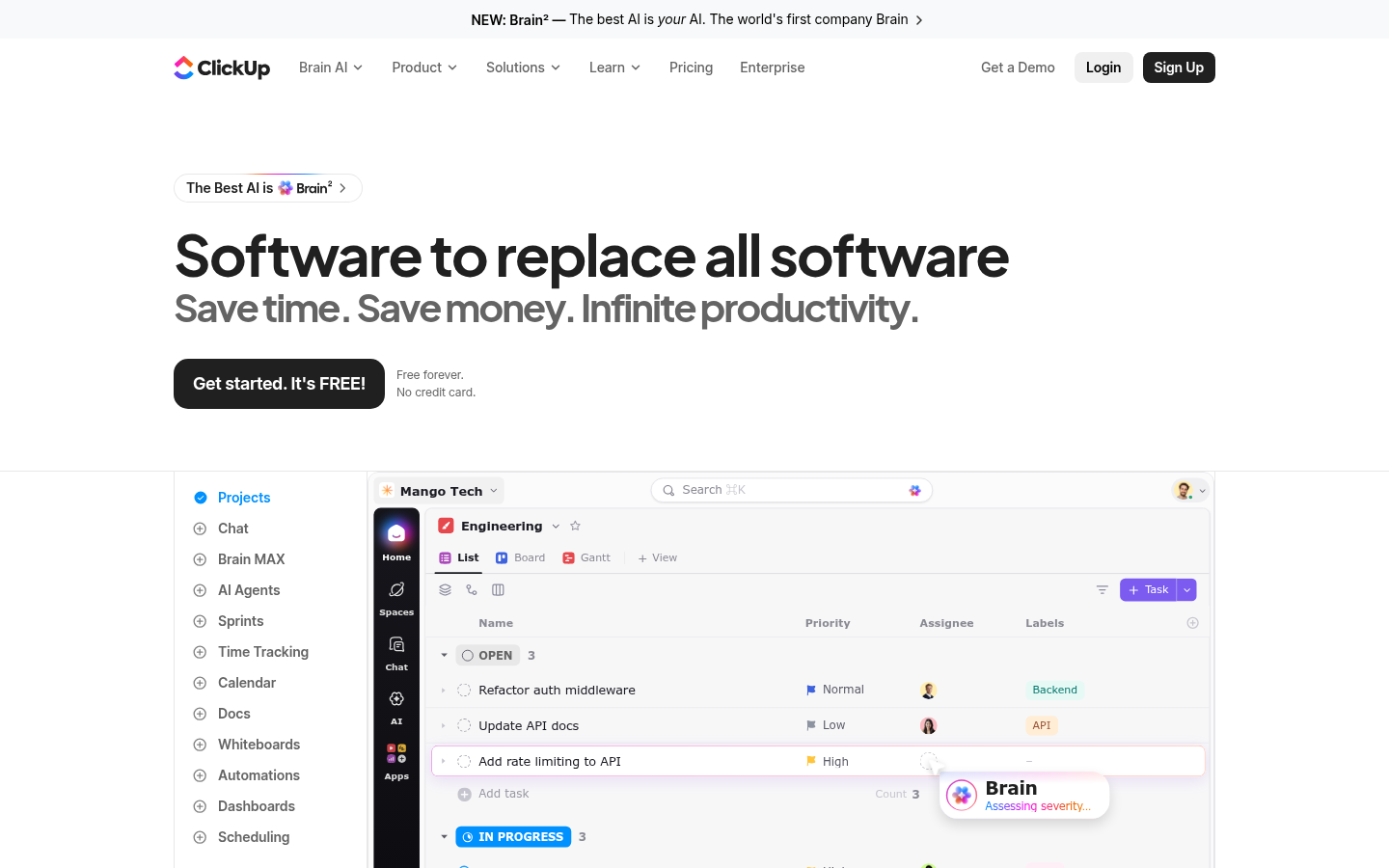
ClickUp functions as a unified work management hub where teams create tasks, write docs, track sprints, manage goals, and chat, all within customizable Spaces and Lists. It supports multiple visual views — List, Board, Gantt, Calendar, and Whiteboards — so different teams (engineering, marketing, operations) can structure work the way they prefer. A built-in AI layer, referred to as "Brain," connects to external models like ChatGPT, Claude, and Gemini, and introduces "Super Agents" that can execute workflows, summarize context, and automate repetitive steps across the workspace. The product is delivered as a web application with companion desktop and mobile apps, making it accessible for distributed teams working across browsers, phones, and desktops.
Key capabilities
- Unified task and project management: Create and organize tasks with priorities, assignees, labels, dependencies, custom statuses, and subtasks across Lists, Boards, and Gantt timelines.
- Docs and Whiteboards: Build collaborative documents and wikis alongside visual whiteboards and mind maps without leaving the workspace.
- Native chat and integrations: Team communication is built into ClickUp Chat, with integrations to tools like Slack, HubSpot, and Google Drive rather than requiring separate messaging apps.
- AI Agents and Brain MAX: Automated agents can triage tasks, draft updates, and pull context from across the workspace; AI features connect to multiple third-party LLMs.
- Time tracking, Sprints, and Goals: Native time tracking, sprint points, sprint reporting, and Goals/Portfolio management support agile and OKR-driven teams.
- Dashboards and reporting: Customizable dashboards with advanced cards, activity views, and timeline views give visibility into team throughput and workload.
- Enterprise controls: SAML SSO, SCIM provisioning, audit logs, custom roles, session management, and regional data residency (US, EU, APAC) support larger, compliance-sensitive organizations.
Pricing
ClickUp uses a freemium model with a Free Forever plan that includes unlimited tasks, unlimited free plan members, 60MB storage, collaborative docs, Kanban boards, sprint management, and 24/7 support. Paid tiers scale up from there: the Unlimited plan starts at $7/user/month billed yearly ($10 billed monthly) and adds unlimited storage, integrations, and native time tracking. The Business plan is priced at $12/user/month billed yearly ($19 monthly) and adds unlimited dashboards, automations (5,000/month), mind mapping, and SSO. Enterprise pricing is custom and adds enterprise permissions, SAML SSO/SCIM, audit logs, and a dedicated customer success manager. A money-back guarantee is advertised, and yearly billing saves roughly 30% versus monthly. Pricing page: View pricing
Editorial review
ClickUp's biggest strength is breadth: few competitors bundle task management, docs, whiteboards, native chat, time tracking, and AI agents into one product with this many configurable views. That breadth makes it a credible alternative to running separate tools like Asana, Notion, Slack, and a time-tracking app simultaneously, particularly for teams that want centralized reporting without stitching integrations together. The free tier is genuinely usable for individuals and small teams, and the paid tiers scale sensibly toward enterprise governance needs like SSO, audit logs, and data residency.
The trade-off is complexity. A platform with this many features — custom fields, automations, sprints, whiteboards, AI agents — carries a steeper learning curve than single-purpose tools, and teams that only need lightweight task tracking may find the interface more crowded than necessary. The AI Agents and "Super Agents" positioning is a newer differentiator worth testing directly, since marketing claims about AI-driven productivity gains should be validated against actual team workflows rather than taken at face value. ClickUp is best suited to teams that want one system of record across projects, documentation, and communication rather than users seeking a minimal, single-function app.