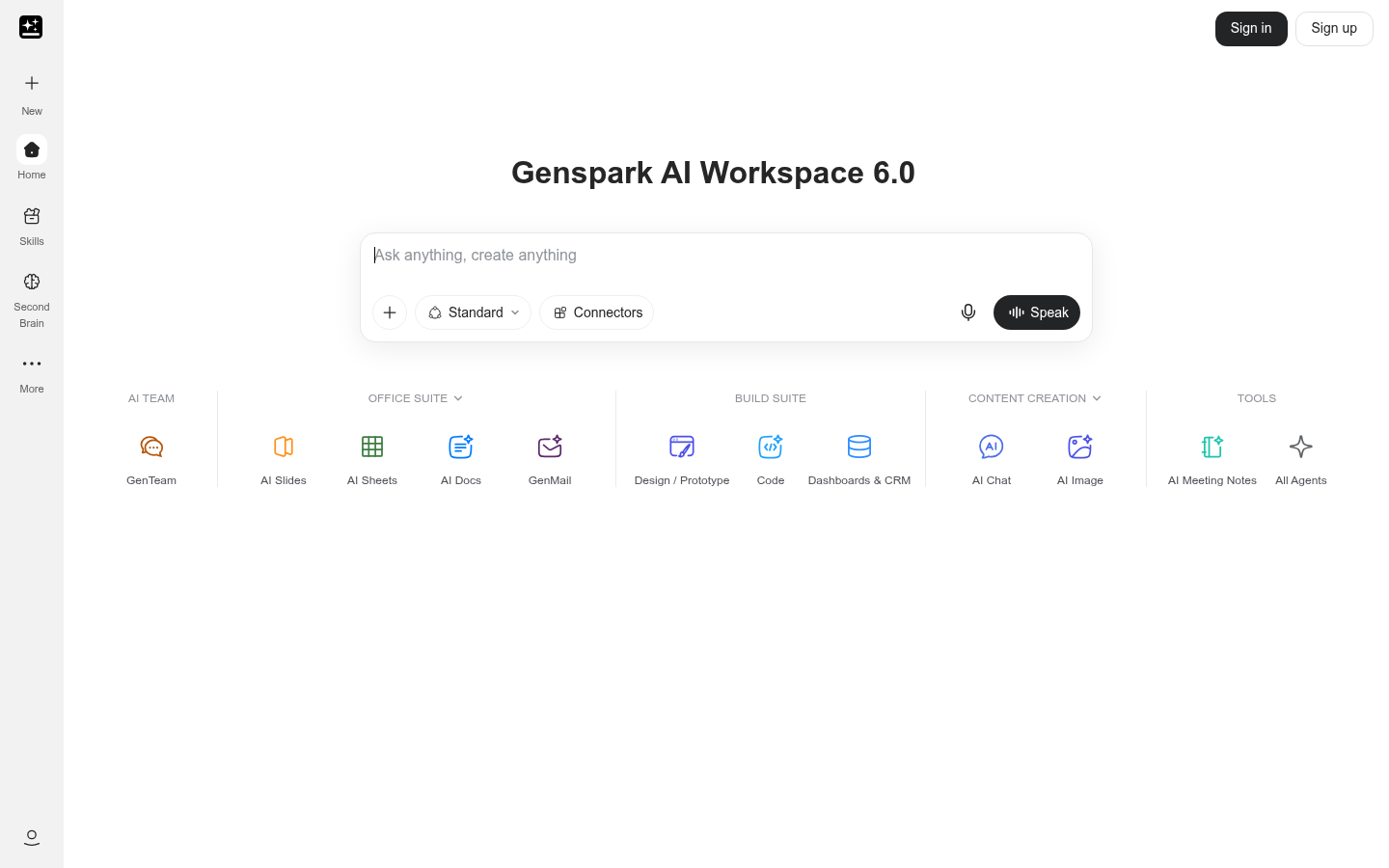
Genspark is an AI workspace built for professionals, analysts, marketers, and students who need to produce finished work — slides, documents, dashboards, images, video, and code — from a single prompt or query. Rather than positioning itself as a narrow point solution, Genspark bundles multiple AI-generation capabilities into one workspace so users can move from raw questions or data to a polished, shareable output without switching between separate tools. It is delivered as a web application with companion iOS and Android apps, targeting business professionals and data analysts who need fast turnaround on everyday deliverables.
What it does
Genspark functions as a general-purpose AI workspace that converts natural-language input into structured outputs. Its core promise, "from a question to a live dashboard in seconds," reflects a broader pattern across the product: users submit a query, topic, or data source, and Genspark's underlying AI models generate a usable artifact — whether that's a presentation deck, a written document, a visual dashboard, an image, a short video, or a piece of code. This makes it relevant for use cases like turning research questions into visual dashboards, drafting slide decks for meetings, generating supporting images or graphics for content, and prototyping code snippets, all inside one interface rather than a chain of separate apps.
Key capabilities
- Multi-format AI generation: Produces slides, documents, images, video, code, and design assets from a single workspace, reducing the need to juggle separate specialized tools for each output type.
- Query-to-dashboard workflow: Converts open-ended questions into live, structured dashboards, aimed at users who need quick data visualization without manual chart-building.
- Cross-platform access: Available as a web app plus native iOS and Android apps, so work started on desktop can be continued or reviewed on mobile.
- Real-time data insights: Positioned to surface data-driven insights quickly, which is useful for business reporting, research summaries, and ad hoc analysis.
- Unified interface for varied outputs: Consolidates document creation, visual design, and coding-adjacent tasks into one product rather than requiring separate subscriptions for each function.
Pricing
Genspark follows a freemium model: the core product is free to use, with premium options available for expanded functionality or usage limits. No specific plan names, tiered pricing amounts, or trial-length details were confirmed in the available source material, so exact costs for premium tiers should be verified directly on the product's own pricing page before making a purchasing decision.
Editorial review
Genspark's main selling point is breadth: bundling slides, docs, dashboards, images, video, and code generation into a single AI workspace is a meaningfully different pitch than most single-purpose AI tools on the market, and it suits users who want to avoid piecing together multiple subscriptions for adjacent tasks. The "query to live dashboard" workflow in particular stands out as a differentiator versus generic AI writing or image tools, since it targets a more analytical, business-reporting use case rather than pure content creation.
The trade-off with this kind of all-in-one approach is depth versus breadth — tools that specialize in a single output type (dedicated presentation builders, dedicated dashboarding platforms, or dedicated video generators) may offer more granular control, templates, or export options than a generalized workspace. Based on the available material, it's not clear how sophisticated Genspark's dashboarding, video, or code capabilities are compared to category-specific competitors, and no integration details, collaboration features, or enterprise controls were confirmed in the source content.
Genspark is likely best suited to business professionals, data analysts, and small teams who want a fast, low-friction way to turn a question or dataset into a presentable output without assembling a multi-tool stack. Users with highly specialized needs — advanced video editing, complex dashboard customization, or production-grade code generation — should verify Genspark's specific feature depth against dedicated alternatives before committing, especially since detailed pricing tiers and premium feature breakdowns were not available in the reviewed content. The free tier makes it low-risk to trial for straightforward use cases like quick slide decks or one-off dashboard generation.